

The National Examination Board (NEB) has published an official notice regarding the Class 12 re-totaling application process for the exam held from Baisakh 21 to Jestha 2, 2082.
This re-totaling process is for those regular or partial examinees who appeared in the Class 12 exam and are not satisfied with their results published on 2082/04/19. If you believe that there may be a mistake in the total marks of your subject(s), you can apply for re-totaling within the given deadline.
Re-Totaling Application Deadline
- Start Date: 2082/04/20, from 1:00 PM
- End Date: 2082/04/29, until 5:00 PM
Make sure to apply within this period. Late applications will not be accepted under any condition.
What is Re-Totaling?
Re-totaling means re-checking your answer sheet to make sure:
- All your answers have been checked.
- The marks given are correctly added.
- No marks are missed or counted wrongly.
Note: This is not a re-check of your answers’ correctness. It only checks the total marks and counting mistakes.
Who Can Apply?
Any student of Class 12 (2082) who:
- Gave the exam in Baisakh-Jestha 2082
- Is not happy with the marks in one or more subjects
- Wants to double-check their result
You can apply for any subject in which you appeared during the exam.
How to Apply for Re-Totaling?
Follow these simple steps to apply for the NEB Class 12 re-totaling process online:
1. Go to the NEB website
Open your browser and visit neb.gov.np
2. Click on “Online Payment (Retotaling)”
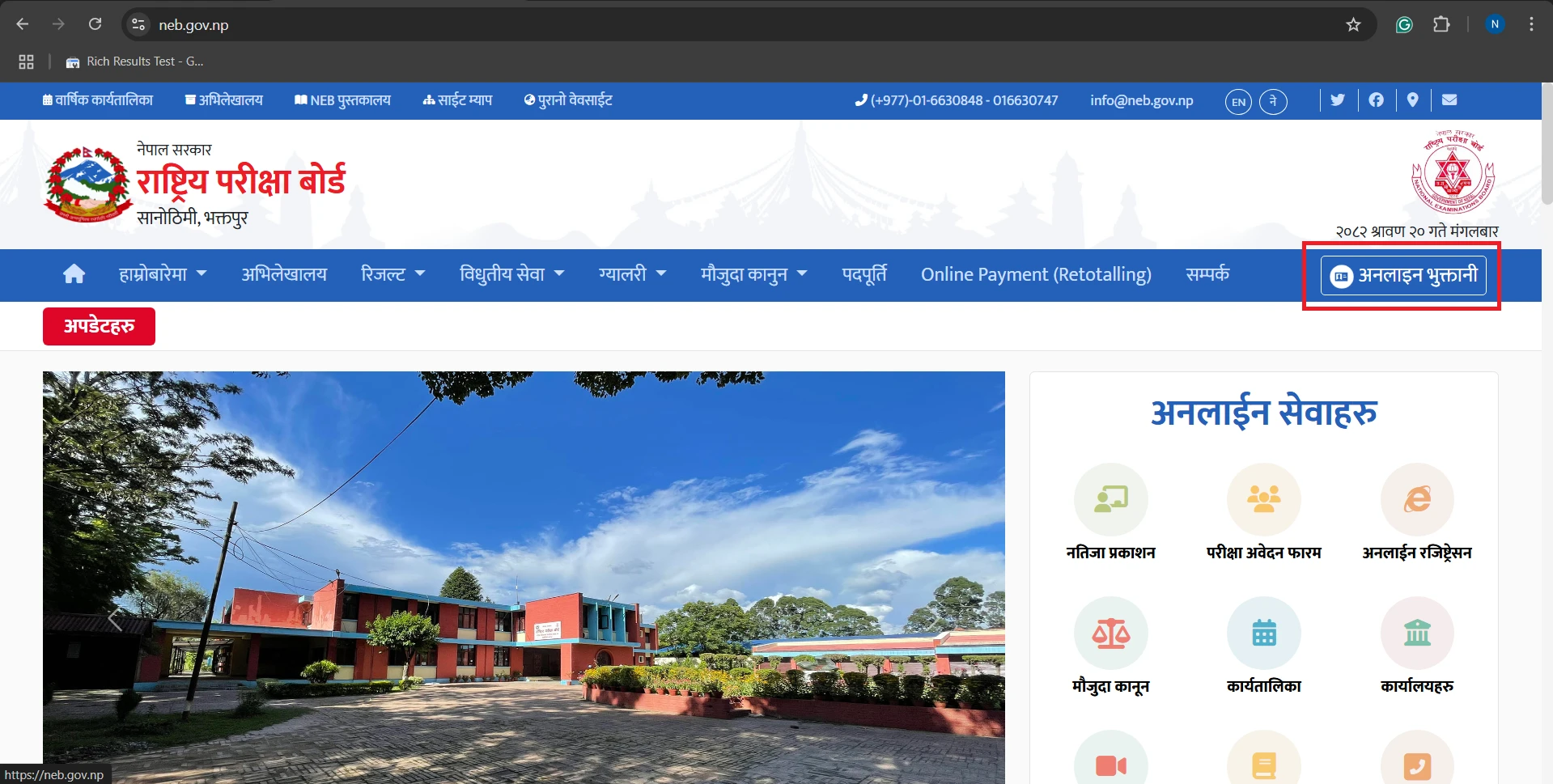
Or directly go to payment.neb.gov.np/StudentPortal
3. Search for your details
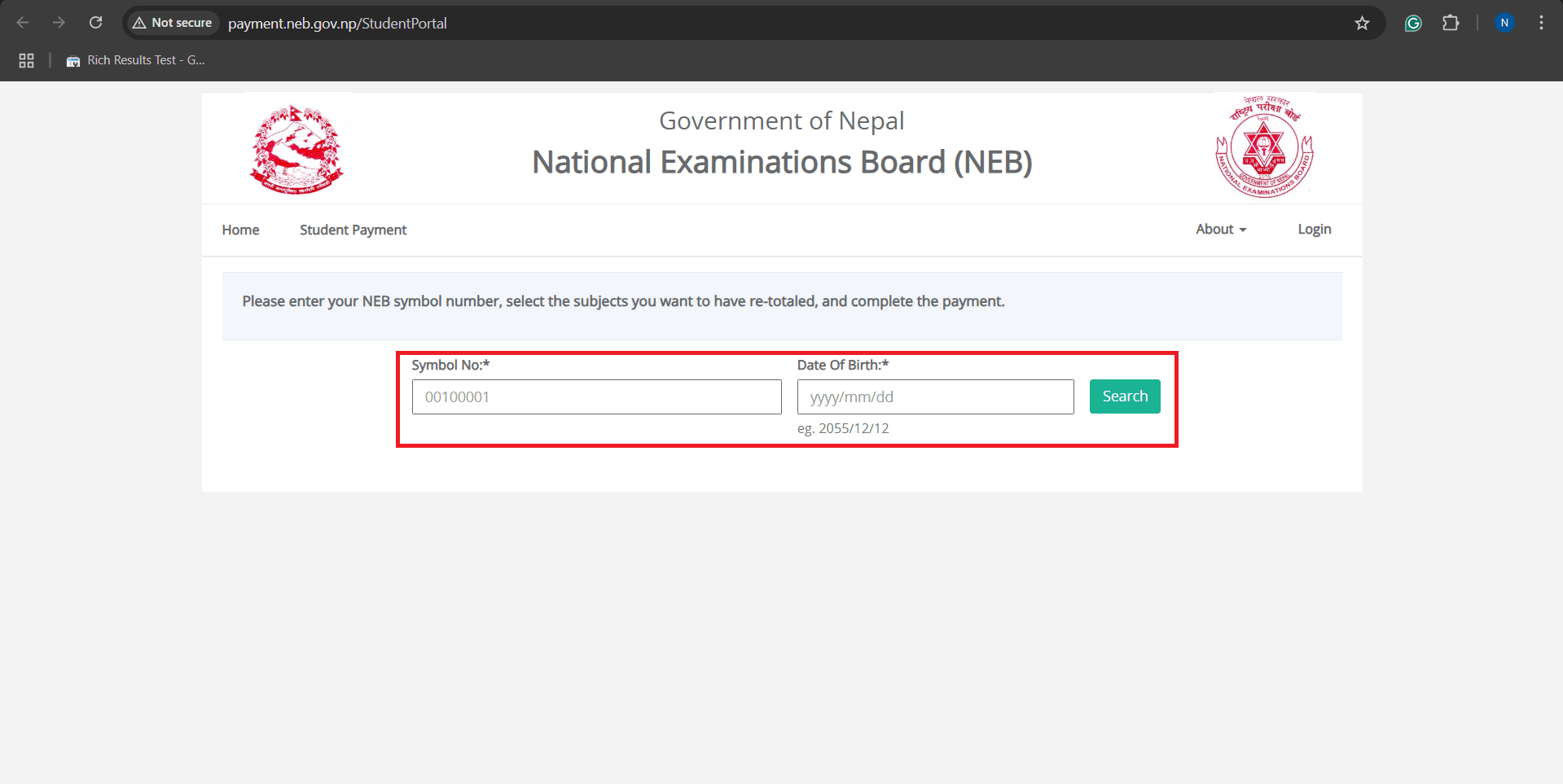
– Enter your Symbol Number
– Enter your Date of Birth (DOB)
– Click on Search
4. Choose the subject(s)
– Select the subject(s) you want to apply for re-totaling.
– Tick the box next to each subject.
5. Pay the fee
– Use any digital wallet like eSewa, Khalti, IME Pay, etc.
– Make sure the payment is successful.
6. Save the confirmation message
– After payment, you’ll get a confirmation message or receipt.
– Take a screenshot or save the file for future reference.
Where to Check the Result?
Once the re-totaling process is complete, NEB will publish the result online. To check your updated result:
- Visit the official website: neb.gov.np
- Look for the latest update on re-totaling results.
Keep checking the site regularly for updates.
Important Notes
- You can apply for one or more subjects, depending on where you feel the marks may be wrong.
- You must apply within the deadline (2082/04/29, 5:00 PM).
- The fee is non-refundable, even if your marks don’t change.
- There is no option to re-check the actual answers; only the total is verified.
Final Message
If you are not satisfied with your NEB Class 12 results and believe that there could be a calculation mistake, this is your chance to fix it. The re-totaling process is simple and completely online. Make sure you have a stable internet connection and a digital wallet ready for payment.
Apply on time, stay updated on the NEB website, and don’t forget to save your payment receipt.
Also Read: